Reviews
Review: KORG M1 V2: The Perfect Rebirth of the 1988 Workstation That Defined an Era
Rating: 4.6 / 5.0
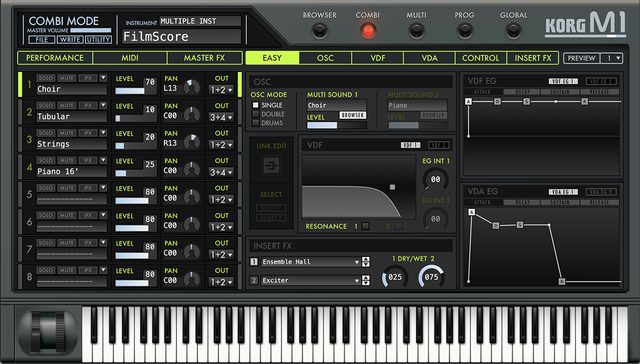
KORG's "M1 V2" is the software version that brings back to life the legendary "M1," released in 1988 as the world's first widely adopted music workstation. With the version 2 update, it now features a fully resizable high-resolution interface and a refined preset browser, optimizing this iconic digital monster for modern studio environments.
In this article, we focus on evaluations from Gearspace, MusicRadar, Reddit, and the YouTube synthesizer community, thoroughly reviewing how this ultimate 90s nostalgia machine performs in modern music production.
1. Evaluation Trends Across Communities, Platforms, and Specialized Media
KORG M1 V2 is recognized worldwide not just as an emulation, but as an indispensable historical archive of 90s sounds.
- Reddit Discussions (r/synthesizers, r/musicproduction): On Reddit, it is praised as the "Holy Grail of 90s house and rave music." Users frequently point out that modern sample libraries and wavetable synths cannot fully replicate the compressed, punchy magic of the original M1's "Piano 16'" or "Organ 2" presets.
- Gearspace / MusicRadar Media Reviews: Professional reviewers emphasize that the V2 update is a massive workflow-saving evolution. The old V1 plugin was notorious for its tiny, non-resizable UI. Gearspace users rejoice that "no magnifying glass is needed to edit envelopes," and MusicRadar appreciates the new tag-based browser that makes navigating the vast library easy.
- YouTube Reviews: Video tutorials highlight its multitimbral capabilities. They demonstrate how layering digital bells over the classic "Universe" choir pad instantly transports any track back to the golden age of 90s ambient and pop.
2. Key Modules and Architecture
Despite being a vintage digital synth, its internal architecture allows surprisingly rich layering.
| Module Type | Features and Community Evaluation |
|---|---|
| AI Synthesis Engine | Perfectly recreates the original AI (Advanced Integrated) synthesis, expanding the original 8MB ROM to include all 32 expansion cards ever released. |
| 8-Part Multitimbral | Layer or split up to 8 independent programs across the keyboard, creating massive, stadium-filling textures. |
| Classic Dual Effects | Faithfully models the original digital effects, providing the gritty, metallic reverb and chorus characteristic of the 90s. |
| V2 Browser and Scalable UI | Introduces a fully resizable high-resolution interface and a modern tag-based browser for instantly finding desired sounds. |
3. Sound Quality: The Essence of the 90s Vibe
Summarizing community feedback, the M1 V2 is defined by its "instantly recognizable, unmistakable retro character."
- House Pianos and Organ Basses: The quintessential sounds of 90s house, techno, and rave. These gritty, biting PCM samples fit perfectly into modern mixes without heavy processing.
- Ethereal Digital Pads: Presets like "Universe" and the breathy digital choir offer a nostalgic, lo-fi digital warmth that modern ultra-clear synths struggle to replicate, making them highly favored in synthwave and ambient genres.
4. Usability, System Load, and Requirements
- V2 Workflow Evolution: The transition to V2 completely resolved past usability issues. The large, scalable screen makes fine-tuning multi-stage envelopes and effect routing a painless experience.
- Remarkable CPU Efficiency: Due to its late-80s digital architecture, CPU load is virtually zero. On modern machines, you can run dozens of instances simultaneously without hesitation.
Pros and Cons Summary
Pros * Definitive 90s Sound: Essential tones for classic house and pop production. * All Expansion Cards Included: All expansion libraries ever made are built-in from the start. * V2 Scalable UI: Resizable interface solves all past visibility issues. * Extremely Low CPU Load: Negligible strain on system resources.
Cons * Basic Synthesis: Sound design structure is very simple by modern standards. * KORG Software Pass: Authentication relies on a sometimes clunky license management app.
Overall Verdict: A Perfect Time Machine to the Sounds That Dominated the Charts
KORG M1 V2 offers a perfect, refined window into the sounds that dominated the charts from the late 80s through the 90s—an ultimate time machine.
As media and communities agree, this is not a deep sound design tool like Pigments or Zebra, but a "hit-making rompler." For producers looking to inject authentic retro digital vibes, classic house pianos, or nostalgic ambient textures into their tracks, this beautifully updated classic is an absolute must-have.
Tips: Practical Techniques to Get the Most Out of KORG M1 V2
The KORG M1 V2 plugin is the complete version of the legendary workstation that dominated the 90s music scene. Here are practical tips and workflows used by producers and beatmakers worldwide to unlock 120% of this plugin's potential in a DAW environment.
1. Ultimate Layering & Splitting in Combi Mode
One of the M1's greatest strengths is "Combi" mode, allowing up to 8 programs (sounds) to be layered.
- Creating Thick 90s House Stabs: If a single piano or strings (in Prog mode) feels thin, layer 3-4 sounds like "Piano 16'" with bell or choir tones in Combi mode, slightly detuning each pitch. Instantly, you get the fat stabs of "club sounds from back then."
- Velocity Splits: Set velocity zones so that different samples (e.g., aggressive percussion or slap bass) sound only when you play hard, adding dramatic dynamics to your performance.
2. Actively Use the New "Resonance" in V2
A feature not present on the original hardware M1 (or early software versions), the V2 plugin adds filter "resonance."
- Adapting to Modern EDM/Synthwave: Raise the resonance in the VDF (filter) section and automate the cutoff to easily create "squelching" acid basses or dynamic synth sweeps that were impossible on the original M1.
- Emphasizing Lo-Fi Textures: Deliberately set high resonance and combine with built-in effects to pseudo-create lo-fi sounds with a unique peakiness, as if run through a sampler, all within the DAW.
3. Modernizing Iconic Presets
M1's famous presets can sound out of place if used as-is, but with a little tweaking, they fit into modern tracks.
- Adjusting Attack: When using "Organ 2" or "Piano 16'," fix MIDI note velocity near maximum or adjust the M1's velocity curve to faithfully reproduce the punchy transients characteristic of samplers from that era.
- Reinforcing and Cutting Low End: 90s digital synths often have thin low end or, conversely, bloated unwanted lows. A standard technique for modern club tracks is to cut unnecessary lows with EQ inside the M1 and layer a pure sine wave sub-bass on the DAW side.
4. The "90s Air" of Built-in Effects and Serial Routing
The secret to the M1's character lies in its two built-in effect units with that early digital grit.
- Effect Chaining: In the routing screen, connect Effect 1 (e.g., stereo chorus) in series to Effect 2 (e.g., digital reverb) to create a completely "mix-ready" patch (with that 90s-specific air) entirely within the M1.
- Bypass Strategy: When mixing into ultra-clear modern EDM or pop, deliberately bypass all M1 built-in effects and run through high-quality DAW reverbs or modern saturators for a cleaner, more solid sound.
5. Multi-Output (Para Out) Setup for DAW Mixing
When using Combi mode for drum kits or multiple instruments (like bass and pads), outputting everything in stereo 2ch makes mixing in the DAW difficult.
- Using Individual Outs: In the M1's output settings, assign kick, snare, or bass/lead to individual outputs like "3, 4, 5..." instead of "L/R." Create multi-out tracks in your DAW to apply dedicated compression to the kick, external high-quality spatial effects to pads, etc., enabling modern mixing.
6. Efficient Searching with Expansion Cards and Browser
Here's how to manage the overwhelming number of presets and expansion cards (PCM / T-Series) without getting lost.
- Filter by Expansion Card: Use the V2 browser to filter by specific expansion cards like "ROM Cards" or "T-Series," quickly finding ethnic instruments or ambient pads commonly used in specific genres of that time.
- Favorite Registration: With over 3,000 sounds, it's essential to star (favorite) any "usable sound" you stumble upon. If you don't, you'll become a "preset wanderer," never finding the same sound again.