Reviews
[Review] KORG microKORG Native: Official Emulation That Revives the "Sound" of the World's Best-Selling Synth in Your DAW
Rating: 4.5 / 5.0
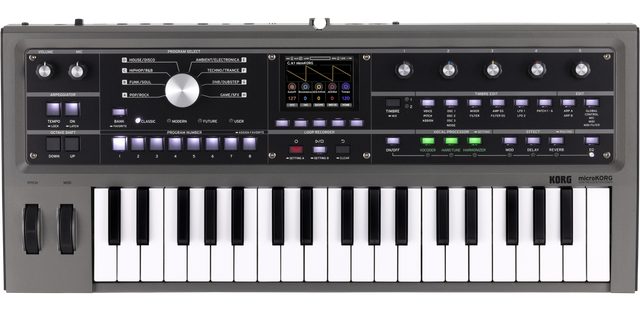
KORG's "microKORG Native" is the official software version of the legendary "microKORG," released in 2002 and renowned as one of the best-selling synthesizers in music history. It fully recreates the aggressive analog modeling engine, DWGS waveforms, and iconic vocoder that defined the sound of the 2000s. In this article, based on reviews from Gearspace, MusicRadar, Reddit, and specialized YouTube channels, we explore how this nostalgic giant performs in modern production environments.
1. Evaluation Trends Across Communities, Platforms, and Specialized Media
The release of microKORG Native sparked a huge wave of nostalgia, but it has also been objectively evaluated against modern standards.
- Discussions on Reddit (r/synthesizers): On Reddit, its "100% sonic accuracy" is highly praised. Users love that "iconic presets used in 2000s indie and electroclash are immediately available in the DAW." However, some point out that its synthesizer architecture is relatively basic by modern standards.
- Media Reviews from Gearspace / MusicRadar: Professional reviewers emphasize the dramatic improvement in workflow. While the hardware unit required tedious menu diving through a matrix grid, the software version beautifully arranges all parameters on a single screen. MusicRadar notes, "Being able to visually confirm patch routing makes you realize how deep this little synth really is."
- YouTube Reviews: Tutorial videos frequently highlight the vocoder function. Demonstrations route DAW vocal tracks into the plugin to instantly create classic robot voices like Daft Punk, earning high praise for its seamless integration.
2. Key Modules and Architecture
Despite its compact origins, its internal engine (based on the MS-2000) is surprisingly robust.
- Analog Modeling and DWGS Oscillators: In addition to traditional analog waveforms, it features KORG's classic DWGS (Digital Waveform Synthesis) with bells, electric pianos, and more—71 waveforms in total—emitting a unique lo-fi digital charm with a gritty texture.
- Virtual Patch Matrix: It includes a 4-slot routing matrix that connects modulators like LFOs and envelopes to various parameters. Historically tedious to set up, this is now surprisingly easy to operate in software.
- 8-Band Vocoder: A signature feature of the microKORG. It includes advanced functions like formant shift and formant hold, which freezes vowel sounds for playing on the keyboard.
- Classic Arpeggiator: The simple yet highly effective 6-pattern arpeggiator syncs perfectly to the DAW's tempo, making it a reliable tool for classic synth-pop sequences.
3. Sound Quality: The Raw "2000s" Vibe
The sound of microKORG Native is not about modern hi-fi sheen but its unmistakable "character."
- Raw and Punchy Tone: The oscillators and filters have a distinctive "chunkiness" and slight aliasing noise, blending perfectly into mixes without heavy EQ. This is exactly the sound that drove the electro and synth-rock revival.
- Legendary Presets: Iconic presets like "A.84" and classic vocoder patches are included as they were. For many producers, being able to instantly recall these specific tones alone justifies the purchase.
4. Usability, System Load, and Requirements
- Comfort of Full GUI: The hardware's genre selection knob and matrix editing were notoriously confusing. The plugin version arranges everything neatly, making sound design an absolute joy and more educational.
- Ultra-Light CPU Load: Based on early 2000s DSP code, the plugin is incredibly lightweight. You can run dozens of instances simultaneously without dropouts on almost any modern PC.
- KORG Software Pass: As with other KORG Native plugins, the required license management app occasionally draws complaints regarding login friction and minor update glitches.
Pros and Cons Summary
Pros * 100% Authentic Sound: Fully recreates the sound engine and presets of the world's most popular synth. * Dramatically Improved UI: Visual editing completely eliminates the infamous menu diving of the hardware. * Seamless Vocoder Integration: Easily route DAW audio into the classic vocoder. * Extremely Low CPU Load: Runs smoothly on any modern setup. * Hardware Compatibility: Allows patch exchange with the physical microKORG.
Cons * Basic Synth Engine: Lacks deep modulation and wavetable features of modern VSTs. * KORG Software Pass Usability: The authentication system can occasionally feel cumbersome.
Overall: Pure Nostalgia and Immediate Workflow Improvements
KORG microKORG Native is an absolute win for those who grew up making music in the 2000s or anyone seeking that unique, punchy retro-digital sound.
It doesn't offer the infinite routing of Serum or the overwhelming scale of Omnisphere, but it doesn't aim to. As the community widely agrees, having this legendary, characterful engine in a beautiful UI with zero hardware wiring hassles is an incredibly inspiring and practical tool. It's a masterpiece that brings a perfect chapter of synthesizer history into modern DAW workflows.
[Tips] Practical Techniques to Get the Most Out of KORG microKORG Native
KORG microKORG Native is a plugin that fully recreates the sound of that iconic instrument essential to electronic music since the 2000s. Freed from hardware constraints, here are practical tips to unleash 120% of its potential using software-specific visibility and flexibility.
1. Sidechain Utilization of the Vocoder
The vocoder, a signature feature of the microKORG, truly shines in the Native version when combined with DAW routing. * Audio Routing: Use your DAW's sidechain function (or audio input) to feed vocal tracks or drum loops directly into microKORG's "Audio In 1." This lets you easily create Daft Punk-style robot voices or rhythmically "talking" synth riffs. * Formant Hold: When you hit a vowel sound you like (like "ah" or "eh"), turn on Formant Hold to freeze that unique filter shape and play it as a regular synth, creating very unique, voice-like lead sounds.
2. Wild Modulations with Virtual Patch
Modulations that required staring at a matrix on hardware are now crystal clear in the Native version. * Source and Destination Combinations: Fully utilize the 4 Virtual Patch slots. Assign "LFO 1" to "Pan" for stereo movement, or "Velocity" to "Filter Cutoff" for expressive patches where harder playing opens the filter—all visually and quickly. * Oscillator Modulation: Use Oscillator 2 (OSC2) as a source to modulate the filter cutoff (audio-rate modulation) for aggressive, metallic, or growling bass sounds.
3. Lo-Fi and Bell Sounds with DWGS (Digital Waveforms)
microKORG features not only virtual analog (VA) but also 64 DWGS (digital waveforms). * Layering Digital and Analog: Select a DWGS bell or electric piano waveform on OSC1, and layer an analog-like sawtooth on OSC2 to recreate that unique "cold yet thick" texture used in early 2000s IDM and electronica.
4. Ultra-Thick Bass and Leads with Unison Mode
- Detuned Unison: Set Voice mode to "Unison" and slightly raise the Detune parameter. This thickens the oscillators, instantly creating Reese basses perfect for drum and bass or dubstep, and massive supersaw leads for trance.
5. Turning the Arpeggiator into a Step Sequencer
- Step On/Off: Leverage the Native version's highly visible UI to intentionally turn off (mute) specific steps in the arpeggiator's step screen (1-8). Simply holding a chord will automatically generate complex, groovy sequence phrases with rests.