Reviews
[Review] KORG multi/poly Native: The Next-Generation Virtual Analog That Surpasses the Legendary Mono/Poly
Rating: 4.8 / 5.0
KORG's "multi/poly Native" is the software version of a next-generation hybrid synthesizer that, while inspired by the legendary 1981 "Mono/Poly," fuses modern wavetables with West Coast-style waveshaping.
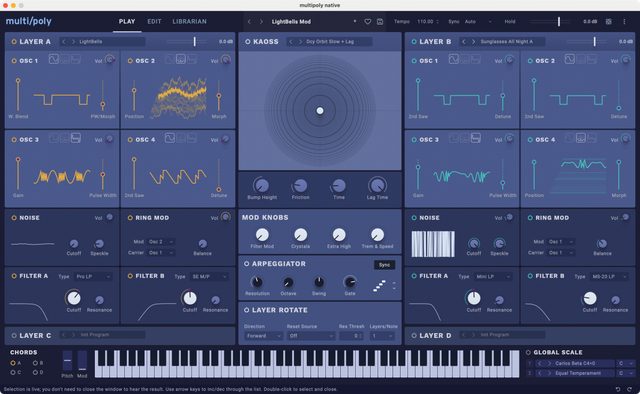
It is not merely a vintage reissue; it boasts a formidable specification of up to 4 layers of 4 oscillators each, and is equipped with KORG's latest modulation engines such as "Motion Sequencing 2.0" and "Kaoss Physics."
In this article, based on reviews from Gearspace, MusicTech, Attack Magazine, Reddit, and specialized YouTube channels, we thoroughly review how this plugin breaks through the "virtual analog wall" amidst rivals like Arturia Pigments.
1. Evaluation Trends Across Communities, Platforms, and Specialized Media
multi/poly Native is praised for its high sound quality and an interface that dramatically improves usability compared to the hardware version.
- Discussions on Reddit (r/synthesizers): On Reddit, the quality of its analog modeling is highly praised, with comments like "In a blind test, you couldn't tell it apart from a real analog synth." However, there is also a sharp observation that resonates strongly within the community: "The factory presets are overloaded with delay and reverb, which masks the synth's inherent raw, thick sound, making it easy to underestimate."
- Media Reviews from MusicTech / Attack Magazine: Specialized media note that "It is frequently compared to Arturia Pigments, but multi/poly wins in terms of synthesis depth and sequencer sophistication." Many reviewers conclude that the software version, freed from the small-screen menu diving of the hardware version and allowing a full overview on a large display, is more efficient for sound design.
- YouTube Reviews: YouTube tutorial videos highlight the "100% compatibility" with the hardware unit. The perfect ecosystem is demonstrated: users can drag-and-drop custom wavetables for import, and transfer patches created on a PC to the hardware for live use.
2. Key Modules and Architecture
The monster spec of a 4-layer configuration produces unimaginably thick sounds.
- Three Powerful Oscillator Types: Each layer is equipped with 4 oscillators, freely selectable from "Classic" (analog waveforms), "Digital" (wavetables), and "Waveshaper" (Buchla-style folded waveforms).
- A Compendium of Classic Filters: Faithfully modeled analog filters from legendary instruments that shaped music history, including MS-20, Minimoog, Prophet-5, and of course Mono/Poly.
- Motion Sequencing 2.0 & Kaoss Physics: A sequencer that varies timing and pitch on independent lanes, and Kaoss Physics, which uses the physical bouncing of a ball to create organic fluctuations, allow for the construction of dynamic, ever-moving sounds.
- Diverse VCA and Envelope Models: Even the attack and decay curves can be switched to finely simulate the characteristics of vintage hardware.
3. Sound Quality: From Warm Analog to Sharp Digital
Its sound is rated as "the fattest and most convincing" among KORG's digital lineup.
- Overwhelming Analog Texture: When classic oscillators are run through heavy vintage filters, the sound is exactly that of a 70s-80s analog polysynth. The drive from VCA modeling gives it a powerful presence in the mix.
- Modern Digital Textures: Using wavetables and waveshapers modulated by Kaoss Physics, you can easily paint contemporary soundscapes, from metallic bells to complexly evolving cinematic pads.
4. Usability and System Load/Requirements
- Practical, Overview-Friendly GUI: The interface has a somewhat utilitarian, rectangle-based design, but the four layers, effects, and sequencer are all well-organized and highly intuitive. It is highly praised: "If you've used Pigments, you'll understand it instantly."
- Unlimited Instances: Unlike the hardware version, being able to run multiple instances of multi/poly in a project as long as the CPU allows is a major advantage of the software version.
Pros and Cons Summary
Pros * Top-Tier Virtual Analog: Excellent sound quality with warmth and thickness. * Overwhelming Synthesis Depth: 4 layers x 4 oscillators integrated with the latest modulation. * Full Compatibility with Hardware: Bidirectional sharing of patches and wavetables with the hardware unit. * Excellent Overview UI: Complex routing can be intuitively operated via drag-and-drop on a large screen.
Cons * Effect-Heavy Presets: Many factory patches are too flashy, hiding the sound's inherent quality. * Too Practical Appearance: The GUI layout is excellent, but the design is a bit plain and lacks flair. * Overwhelming Amount of Information for Beginners: With so many features, it's hard to grasp the full picture without basic synth knowledge.
Overall Review: A "Universal Workhorse" That Breaks Down the Barriers Between Analog and Digital
KORG multi/poly Native is an astonishing synthesizer that, while bearing the name of a legendary instrument, does not rest on its laurels but packs in the pinnacle of modern technology.
As recognized by media and communities, it perfectly meets all demands, whether as a pure analog emulation or as a complex modern wavetable synth. Freed from the hardware version's menu diving, this plugin allows you to control its thick sound on an intuitive large screen, making it the ultimate "one-size-fits-all" companion for every producer.
[Tips] Practical Techniques to Get the Most Out of KORG multi/poly Native
KORG multi/poly Native is the latest plugin that inherits the spirit of the legendary analog synthesizer Mono/Poly while fusing next-generation analog modeling technology with the flexibility of digital. Here are practical tips to unleash 120% of this synth's potential in your DAW environment.
1. Control Analog Feel with "Virtual Voice Cards"
The true essence of multi/poly lies in modeling not only the oscillators but also the behavior of envelopes and VCAs. * Add Vintage-Specific Fluctuation: By adjusting the voice card variation and the "Analog Drift" parameter, you can introduce subtle deviations (instability) in pitch and filter characteristic of the original hardware. * Use Legendary Envelope Curves: VCA response curves from classics like Mono/Poly, MS-20, and ARP Odyssey are provided. Switching between them dramatically changes the punch of the attack and the natural decay of the release.
2. "Hybrid Sound Design" Using 4 Oscillators
Each program features 4 oscillators, allowing free combination of analog and digital. * Fusion of East Coast and West Coast: Use OSC1 for classic analog waveforms (East Coast) and OSC2 for waveshaping (West Coast). By applying X-Mod (cross modulation) or sync, you can generate aggressive, metallic hybrid basses and leads that go beyond simple analog modeling. * Import Wavetables: The digital oscillators can load user-created wavetables or those from the modwave.
3. Parallel/Serial Crossfade of Dual Filters
This powerful section allows simultaneous use of two modeled filters (M/Poly, Mini ladder, MS-20, etc.). * Modulate Filter Balance: Place the two filters in series or parallel and modulate the "A/B balance" with an LFO or Kaoss Physics. Set one to the sharp high-pass of the MS-20 and the other to the sweet low-pass of the M/Poly, then fade between them to create complex, undulating organic pads.
4. Dynamic Sequences with Layer Rotate
This function, a hallmark of the original Mono/Poly that cycles through oscillators, is expanded to its extreme. * Round-Robin Arpeggios: Layer up to 4 completely different programs (sounds) and enable "Layer Rotate." Activate the arpeggiator and hold a chord; different programs will switch at each step, creating unpredictable polyrhythmic sequences ideal for IDM and electronica with just one key press.
5. Kaoss Physics Automation Unique to the Native Version
"Kaoss Physics," which uses the physical bouncing of a ball on an X/Y pad as a modulation source, becomes even more powerful in a DAW environment. * Perfect Synchronization with the DAW: Use your DAW's automation to precisely control the pad's tilt, ball friction, and the timing of ball bounces to match the song's arrangement. This allows you to create chaotic modulation sweeps that are random yet perfectly synchronized to the musical grid.