Reviews
【Review】KORG Opsix Native: The "Altered FM" Monster That Breaks Down the Walls of FM Synthesis
Rating: 4.6 / 5.0
KORG's "Opsix Native" is a software plugin that fully recreates the internal engine of the highly acclaimed hardware synthesizer "Opsix" within your DAW. KORG calls this synth not just FM (Frequency Modulation) but "Altered FM," and it goes beyond traditional sine-wave-based FM synthesis, using ring modulation, wave folding, filters, and more to create entirely new sounds.
1. Evaluation Trends Across Communities, Platforms, and Specialist Media
Opsix Native has garnered enthusiastic support from specialist media for overturning the paradigm of FM synthesis, which is often considered difficult to master.
- Gearspace Evaluation: Users on Gearspace highly praise the concept of the "operator mixer." Many comments say, "It's genius to break down the invisible, complex concept of FM synthesis algorithms into an intuitive mixer where you just adjust the volume and pitch of each operator." On the other hand, some voices miss the tactile feel of the physical sliders on the hardware version.
- MusicRadar / Sound On Sound Media Evaluation: Reviews from MusicRadar and others describe it as "no longer confined to the FM synth category." The flexibility to be used like subtractive synthesis or virtual analog is highly praised. Sound On Sound concludes, "It's an extremely educational and creative tool that completely removes the fear of FM synthesis."
- YouTube Reviews (Loopop, True Cuckoo, etc.): In-depth YouTube tutorial videos emphasize the variety of operator waveforms. Since you can use not only sine waves but also dozens of waveforms (such as sawtooth and square waves) as modulation sources, they demonstrate how you can create sharp dubstep basses or sweet analog-style pads in seconds.
2. Main Modules and Architecture
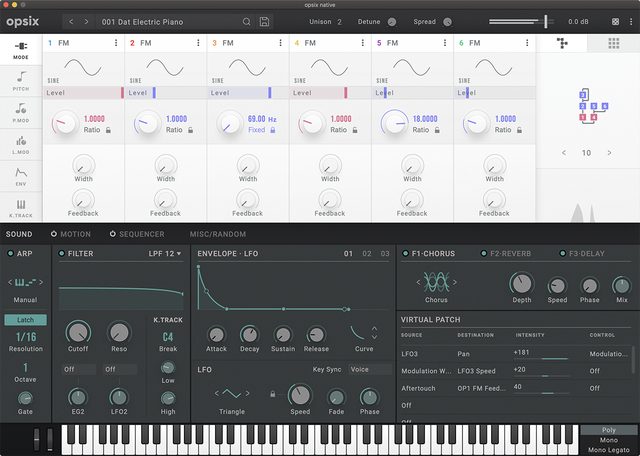
Opsix Native features a powerful architecture that allows you to freely reconfigure six operators.
- 6-Operator "Altered FM" Engine: Each operator can operate not only as FM but also as a ring modulator, filter, filter FM, or wave folder. This covers everything from metallic FM sounds to fat analog sounds.
- Intuitive Operator Mixer: The relationship between carriers (which produce sound) and modulators (which modulate sound) is visually represented in a color-coded mixer, allowing intuitive control of levels and pitch.
- User Algorithms: In addition to 40 preset algorithms, you can freely route the connections between the six operators yourself, enabling infinite sound design possibilities.
- 3 Powerful Effect Slots: Not only chorus and reverb, but also high-quality effects like amp simulators and grain shifters can be used in three serial slots, outputting polished sounds that sit well in a mix.
3. Sound Quality: From Cold Glass to a Growling Beast
Summarizing opinions from media and communities, the sound of Opsix Native is "extremely transparent yet versatile enough to intentionally dirty up."
- Transparent Modern FM: Glassy bells and electric pianos reminiscent of the 80s DX7 resonate with astonishing clarity. They are noise-free and stand out beautifully in a mix.
- Aggressive Electronic Sounds: By utilizing wave folders and MS-20-modeled filters, you can easily generate violent industrial noise or thick growl basses for EDM that you wouldn't expect from an FM synth.
4. Usability, System Load, and Requirements
- Beautiful Color-Coded GUI: The biggest advantage of the software version is that all algorithms and mixer routings can be viewed on one large screen. The color coding (e.g., carriers in red, modulators in blue) is excellent, allowing complex patches to be understood at a glance.
- Stable CPU Performance: Although it runs the exact same code as the hardware, the CPU load is sufficiently low and optimized on modern PC environments, making it comfortable to run multiple instances.
Pros and Cons Summary
Pros * Intuitive FM Synthesis: The mixer UI makes complex FM sound design visually understandable. * Flexibility of Altered FM: Goes beyond FM, enabling diverse approaches like subtractive synthesis and ring modulation. * User Algorithms: By creating your own routings, sound design possibilities become infinite. * Full Compatibility with Hardware: Patches can be shared bidirectionally with the Opsix hardware unit.
Cons * KORG Software Pass Usability: Like other KORG native products, the license management app has some quirks. * Information Overload: Although easier to view than the hardware version, beginners still need to learn to grasp all the modulations. * Lack of Physical Faders: The absence of the "real-time control via physical sliders," which was a major appeal of the Opsix, is a downside.
Overall Review: A "Modern Classic" That Rewrites the History of FM Synthesis
KORG Opsix Native is a revolutionary plugin that completely shatters the preconception many producers had that "FM synthesis is difficult and unintuitive."
As proven by Gearspace and Sound On Sound, this is not just a revival of retro FM sounds but a vast canvas for next-generation sound design. From transparent ambient pads to sharp synthwave leads and aggressive bass music textures, this synth covers all genres and will surely bring "new sounds no one has ever heard" to your tracks.
【Tips】Practical Techniques to Get the Most Out of KORG opsix native
KORG opsix native is an "Altered FM" synthesizer that rebuilds the traditionally difficult FM synthesis into a visual and intuitive format using the "operator mixer." Here are practical, community-driven tips to unleash 120% of this plugin's potential in your DAW environment.
1. DAW Automation of the Operator Mixer
opsix's greatest invention, the color-coded mixer (carriers = red, modulators = blue), directly connects to sound design and performance. * Real-Time Timbre Changes: Use your DAW's automation features to move the ratio or level of specific modulators over time. This allows you to visually create dynamic progressions, such as a quiet sine-wave pad gradually transforming into a metallic, aggressive dubstep bass.
2. Choose "Altered" Waveforms Beyond Sine Waves
Traditional FM synthesis is based on sine waves, but opsix allows you to set a wide variety of waveforms for operators. * Use Noise or Sawtooth as Modulators: Try selecting a sawtooth wave for the carrier and assigning noise or a square wave to the modulator. Without thinking about complex FM formulas, you can instantly obtain lo-fi textures or sounds with intense harmonics, like hard sync on analog synths.
3. Utilize Operator Modes (Wave Folder / Filter)
Each opsix operator is not just a material for FM; it has "modes" that make it behave like an effect unit itself. * West-Coast Style Wave Folder: Change an operator's mode from "FM" to "Wave Folder." This function folds the input waveform to add harmonics, allowing you to easily create metallic, harmonic-rich pluck sounds typical of West Coast modular synths like Buchla, starting from a single sine wave.
4. Dynamics Control via Virtual Patch (Mod Matrix)
Build the "expressive dynamics" that are a key pleasure of FM synthesis. * Control Modulation Amount with Velocity: In the virtual patch screen, set the source to "Velocity" and the destination to "Level of a specific modulator." This quickly and visually builds the basic structure of a classic expressive FM patch: playing softly yields a round electric piano sound, while playing hard changes it to a metallic bell tone.
5. Three Powerful Effect Chains
opsix native includes three slots for KORG's high-quality effects. * Building an Ambient Machine: It comes with very powerful "Shimmer Reverb" and "Grain Shifter." Simply create a simple FM electric piano and connect effects in series in the effect slots, such as "Chorus/Phaser" → "Tape Echo" → "Shimmer Reverb," and you'll have a polished cinematic ambient sound without needing external plugins.