Reviews
【Review】KORG Wavestate Native: An 'Organic Sequencing' Synth of a Different Dimension, Evolving the Legendary Wavestation
Rating: 4.7 / 5.0
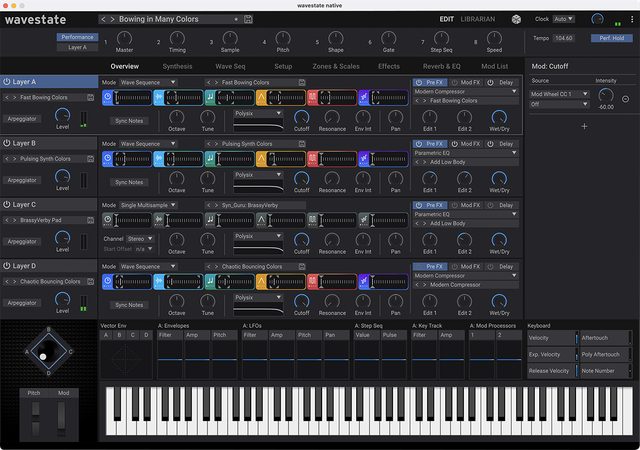
KORG's "Wavestate Native" is an official software plugin that fully ports the engine of the hardware synthesizer "Wavestate," which inherits the DNA of the legendary 1990 "Wavestation" while evolving in a different dimension.
Its greatest weapon is "Wave Sequencing 2.0," which modulates timing, sample, pitch, shape, and gate in independent lanes. By simply holding down a single note, it generates cinematic soundscapes and complex polyrhythms that never repeat the same pattern twice, endlessly changing and evolving.
In this article, we place the greatest weight on evaluations and discussions in the KVR Audio Forum, Reddit, and YouTube synthesizer communities, thoroughly reviewing the differences from the hardware version and the true value of this plugin in modern production environments.
1. Evaluation Trends Across Communities and Platforms
Wavestate Native received an enthusiastic welcome from the community due to its full compatibility with the hardware and the comfortable UI unique to software.
- Evaluation on KVR Audio Forum: KVR sound designers highly praise the liberation from the hardware version's biggest weakness: "complex editing on a small screen." With mouse drag-and-drop and visual editing screens for each lane, it is evaluated that "the true potential of Wave Sequencing 2.0 has been fully unleashed for the first time through software."
- Discussions on Reddit (r/synthesizers, r/filmscoring): On Reddit, it has gained strong support from film score composers and ambient producers. "Pressing one chord completes an entire intro or development for a song," and its cinematic readiness is highly valued. On the other hand, there are discussions such as "Understanding the lane structure of Wave Sequencing from scratch takes time" and "The presets are too complete, requiring effort to figure out how to blend them into your tracks."
- YouTube Reviews (Loopop, Starsky Carr, etc.): In YouTube tutorial videos, the complete preset compatibility between the hardware unit and the plugin, as well as the user sample import function, are highlighted. Additionally, the gimmick of using the dice icon (randomizer function) to instantly generate unexpectedly superb textures has captivated many creators.
2. Main Modules and Architecture
It features a 4-layer structure and the innovative Wave Sequencing 2.0 engine.
- Wave Sequencing 2.0: Timing, sample, pitch, shape, gate, and step sequencer operate in lanes with independent loop lengths. This polyrhythmic approach produces unpredictable, organic sound changes.
- 4-Layer Architecture: Integrates four complete Wave Sequence engines within a single patch. The vector joystick allows real-time crossfade control of the balance of the four layers.
- Diverse Filter Models: Includes numerous analog modeling filters from KORG's legendary classics, such as the aggressive MS-20 lowpass/highpass filter and the smooth Polysix filter.
- User Sample Import: Import up to 4GB of custom samples. You can incorporate your own audio material as Wave Sequence material.
3. Sound Quality: A 'Dynamic Resonance' That Colors Everything from Film Music to Electronica
Summarizing community opinions, the sound is "a relentlessly dynamic texture that never stands still."
- Unparalleled Cinematic Soundscapes: Pads where orchestral and ethnic instruments, cold metallic sounds, and beautiful acoustic pianos morph kaleidoscopically over time are uniquely powerful in film, game, and ambient music.
- Intricately Complex Polyrhythmic Loops: By sequencing drum kit and percussion samples, you can build organic and tricky rhythm tracks that ordinary drum machines could never produce.
4. Usability, System Load, and Requirements
- Visual and Comfortable GUI: Tasks that required diving into menu hierarchies on the hardware unit can now be seen at a glance on a large, resizable screen, dramatically speeding up sound design.
- KORG Software Pass and Authentication: The only point of dissatisfaction in the community is the behavior of KORG's installer and license management app (KORG Software Pass). Errors during initial activation and the lack of GUI polish are cited as areas for improvement.
Pros and Cons Summary
Pros * Overwhelming expressiveness of Wave Sequencing 2.0: Organic sounds that evolve infinitely through independent lanes. * Significant usability improvement over the hardware version: A refined UI that allows comfortable editing on a large screen. * Full compatibility with the hardware unit: Patches and samples can be transferred between hardware and software. * Support for 4GB of user samples: Deep sound design using your own audio material. * High cost performance: Significantly more affordable than the hardware unit.
Cons * Learning curve due to unique architecture: It takes time to intuitively master lane-based modulation. * Usability of KORG Software Pass: Issues with the convenience of the installer and authentication system. * Strong presence of presets: Because each sound is too complete, adjustments are needed to create space within an arrangement.
Overall Review: A Masterpiece That Opens New Horizons in Cinematic Sound Design
KORG Wavestate Native is a monster synthesizer that brilliantly reconstructs the magic of the original Wavestation with cutting-edge 21st-century technology.
As the community has proven, software conversion has completely eliminated the only bottleneck of the hardware version—its complex operability—and succeeded in drawing out 100% of its true potential. For all producers seeking "living sounds" that evolve beautifully over time in film music, ambient, and cutting-edge electronic music, this is an essential plugin you must have.
【Tips】Practical Techniques to Get the Most Out of KORG wavestate native
KORG wavestate native is a next-generation rhythm & texture monster that rebuilds the legendary Wavestation and features Wave Sequencing 2.0. Here are practical tips to unleash 120% of this synth's potential, as discussed in the community.
1. Changing Loop Lengths per Lane (Building Polyrhythms)
This is the true essence of Wave Sequencing 2.0. Deliberately set different step counts and loop start/end positions for each lane, such as "Sample" and "Timing" (e.g., Sample: 16 steps, Timing: 15 steps). This generates organic, polyrhythmic textures that never repeat endlessly.
2. Importing Your Own Samples with Sample Builder
Using the dedicated Sample Builder application, you can import up to 4GB of your own samples (user multisamples) into wavestate native. Load your voice or field recordings and chop them up with wave sequences to create completely original, granular-like sounds.
3. DAW Automation of the Vector Joystick
The vector envelope/joystick, which controls the volume balance of the four layers (A, B, C, D), pairs perfectly with DAW automation. By automating the X/Y axes of the joystick with slow, drawn movements in your DAW, you can easily create cinematic, massive pads that change expression moment by moment.
4. The Intelligent "Dice (Randomize)" Function
The "dice" icon in the upper right corner is not just a randomizer. When clicked, the menu allows you to narrow down the randomization targets, such as "filter only," "effects only," or "wave sequence only." This feature is highly regarded in the community as a catalyst when you're stuck for ideas.
5. Softening Digital Character with Vintage Filters
To add warmth and thickness to sharp digital wave sequence sounds, select the "MS-20" or "Polysix" modeling filters in the filter section. By raising the filter resonance and driving it slightly, you can achieve a fat hybrid sound that blends digital and analog.