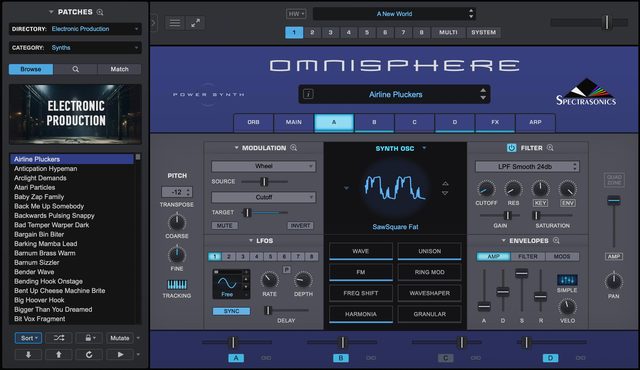
Reviews
[Review] Spectrasonics Omnisphere 2: The "Absolute King" of Software Instruments Dominating Film Music to Modern Pop
Rating: 4.9 / 5.0
Developed by Spectrasonics, "Omnisphere 2" is a monster workstation that stands at the pinnacle of software synthesizers and sample instruments, crafted by the team led by Eric Persing.
It boasts an overwhelming scale and depth, featuring a vast sound library of over 14,000 sounds, high-resolution DSP oscillators, granular synthesis, and "Hardware Synth Integration" that allows direct control of the plugin with 65 or more actual hardware synthesizers.
In this article, we place the greatest weight on evaluations and discussions from professional composers and producer communities on KVR Audio Forum, Reddit, and YouTube, thoroughly reviewing the true value of this product that continues to be the de facto standard in the music industry.
1. Evaluation Trends Across Communities and Platforms
Omnisphere 2 is highly regarded as a "must-have investment" in every production setting worldwide, from film score composers to beat makers of EDM, pop, and trap.
- Reddit (r/filmscoring, r/edmproduction) Evaluation: "A Once-in-a-Lifetime Purchase":
- In Reddit threads asking, "If you could only buy one plugin in your life, what would it be?", Omnisphere 2 is the most frequently mentioned. Film, TV, and game music composers praise it, saying, "90% of the sounds required for client work can be found instantly." On the other hand, the luxurious complaints always mentioned are that "the $499 list price is a high barrier since sales are rare" and "there are too many sounds, making it time-consuming to choose (option paralysis)."
- KVR Audio Forum Evaluation: "Deep Synthesis Beyond a Preset Machine":
- Core sound designers on KVR unanimously say, "It's a waste to use Omnisphere just as a preset instrument." The granular function that imports and stretches your own audio to the extreme, the multi-timbral configuration of up to 8 parts, and the seamless hardware integration are highly praised as top-tier in the industry even as a synthesis engine.
- YouTube Reviews (Guy Michelmore, Venus Theory, etc.):
- In videos by renowned composers and synth reviewers on YouTube, the unique atmosphere created by Spectrasonics' original "psycho-acoustic sampling" (e.g., burning pianos, acoustic instruments played with an electric bow) is demonstrated. They rave that a single note has enough persuasive power to evoke an entire movie scene.
2. Main Modules and Architecture
Omnisphere 2 adopts a hybrid structure where sampling and synthesis are perfectly fused.
| Module Type | Features and Community Evaluation |
|---|---|
| Hybrid Engine | In addition to high-quality sample sounds exceeding 64GB, over 500 DSP wavetables and analog modeling waveforms can be freely blended. |
| Hardware Synth Integration | A revolutionary feature that allows mapping the knobs of 65 or more actual synths (Moog, Sequential, Roland, Korg, etc.) directly as Omnisphere controllers. |
| Granular & Arpeggiator | Equipped with granular synthesis that breaks samples into particles to create dreamy pads, and an evolved arpeggiator supporting chord patterns and MIDI capture. |
| 58 Studio-Grade Effects | Includes a top-tier effect rack with analog-modeled compressors, exquisite reverbs, vintage EQs, etc., eliminating the need for external plugins. |
3. Sound Quality: "Overwhelming Scale" That Transforms Every Genre
Summarizing community opinions, the sound of Omnisphere 2 has "persuasive power that completely dominates space."
- Unparalleled Cinematic Pads and Textures: Pads and drones where organic acoustic instrument sounds and electronic sounds blend at a high level possess depth and atmosphere that no other synth can reproduce, making them decisive in film music production.
- Leading Modern Music Trends: Many hit songs dominating the Billboard charts use Omnisphere factory presets as-is, including bells that are standard in trap and R&B, processed acoustic guitar sounds, and thick analog basses.
4. Usability, System Load, and Capacity Challenges
- Comfortable Search with Sound Match & Sound Lock: To find the desired sound from over 14,000 tones, "Sound Match" (which instantly lists similar sounds) and "Sound Lock" (which allows changing only the sound while keeping favorite effects or arpeggios fixed) are extremely effective.
- Storage and Machine Spec Requirements: Installing the library requires over 64GB of free space (a fast SSD is essential). Also, launching multiple heavy multi-patches consumes a fair amount of RAM, so a 16GB to 32GB or more RAM environment is recommended for serious use.
Pros and Cons Summary
Pros
- Over 14,000 Top-Tier Presets: An overwhelming sound asset covering all music genres.
- Unique Hybrid Synthesis: Fusion of samples, DSP oscillators, and granular synthesis.
- Hardware Synth Integration: Your hardware synths become dedicated controllers.
- Sound Match Function: Excellent searchability to find sounds without losing inspiration from the vast library.
- Highest Quality Built-in Effects: 58 studio-quality FX usable as-is up to the mixing stage.
Cons
- High Price and Few Sales: The $499 price is a high barrier to entry.
- Large Storage Consumption: Requires about 64GB of SSD space.
- Option Paralysis: Too many sounds can lead to losing time when browsing without purpose.
Overall Review: The "Ultimate Sound Station" Ruling Professional Settings
Spectrasonics Omnisphere 2 transcends the framework of a mere software instrument; it is "the greatest source of inspiration in modern music production."
Although there are hurdles of initial investment such as price and storage capacity, it possesses overwhelming power to elevate the quality of your music to a professional dimension from the very day you introduce it. For film and media composers, and producers of pop and electronic music, owning it provides the ultimate peace of mind—a true "once-in-a-lifetime" masterpiece.
[Tips] Sound Design Tips to Explore the Depths of Spectrasonics Omnisphere 2
Spectrasonics Omnisphere 2 is a monster instrument that fuses a vast sampling library with a powerful synthesis engine. Just playing presets is wonderful, but here we introduce more advanced, nerdy tips practiced by overseas communities and sound designers.
1. The Vicious Fusion of User Audio (Your Own Samples) and Granular
Omnisphere 2 allows you to import your own WAV files (User Audio) and use them as synthesizer oscillators. * Modulating Sample Start Position: Load everyday environmental sounds or noise, and turn on the "Granular" engine. Then, in the modulation matrix, assign a random waveform LFO to "Sample Start" and speed up the LFO to near audio rate. This instantly creates glitchy, unpredictable IDM-oriented textures where the original sample is unrecognizable.
2. Pseudo-Wavetable / Cluster Generation Using Harmonia
The "Harmonia" function adds up to 4 additional voices to the oscillator sound. Here's a trick for using it. * Cluster Drones with Ultra-Fine Detuning: Instead of setting the pitches of Harmonia's 4 additional voices to form a chord, set them all to extremely fine detune values like "+0.1" or "-0.2", and spread their panning left and right. Sending this into a reverb creates thick, eerie dissonant tone clusters that undulate ominously, like a horror movie score, from a single oscillator.
3. Organic Morphing with The Orb via DAW Automation
The Orb in the center of the interface is a powerful tool that intelligently morphs parameters between layers. * Chaotic Modulation Using Inertia: The Orb can not only be moved with the mouse but also assigned as a modulation target. Assign LFOs to "Orb Angle" and "Orb Radius" at different rates. Additionally, turning on Inertia automatically generates ever-changing cinematic ambient pads, which are great for film scoring.
4. Looping Envelopes
Omnisphere's envelopes can be set in complex multi-stage steps, but they also have a loop function. * Envelopes as Complex LFOs/Sequencers: Set a "Loop" between specific stages of the Mod Envelope and sync it to the DAW tempo. Assign this to filter cutoff or FM depth to freely design complex wobble basses for dubstep or irregular rhythmic sequences that standard LFO modules cannot create.
5. Ultimate Velocity Crossfades in Stack Mode
Stack Mode combines multiple parts (up to 8) for ultimate expression. * Complete Texture Transition by Velocity: In the Stack Mode screen, select the "Velocity" tab and set the velocity zones of four completely different patches (e.g., Part 1: quiet sub-bass, Part 4: aggressive noise brass) to smoothly crossfade. With just the strength of your keyboard playing, you can seamlessly navigate between four entirely different worlds, creating an expressive, powerful performance patch.